Gridlines are better than axes
Almost always, gridlines are better than axes. At least for vertical axes.
I admit, vertical axes are the default option, and they have been around for centuries, so they are very well known. But your typical vertical axis also has some downsides. My biggest problem with vertical axes is that they’re often so far away from where the action is really happening. Take a typical chart like this, were nothing is really happening on the left (all the values are zero), but the growth is really big on the right hand side of the visual:
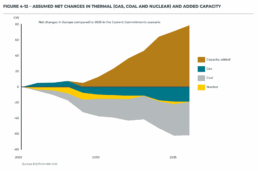
If you want to know the data values near the end of the chart, in 2036 in this case, we almost have to take out a ruler to measure, but the lack of axis ticks (the little horizontal lines next to the numbers) and the distance make that hard to do:

A simple compromise is to move the axis to the right hand side of the visual, where it’s much closer to the ‘action’ — the values we’re actually most interested in:

We had to move the legend to the left in order to free up some space for the axis, but it actually worked out really well. Notice also how we’ve added some explicit tick lines to increase the precision of the visual.
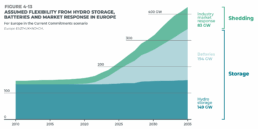
However, moving the vertical axis to the right hand side is not always an option. Often, we’ll have some direct labels or annotations on that side that make it harder to fit in the axis. It would create too much of a barrier between the data and the text. Take this visual for example:
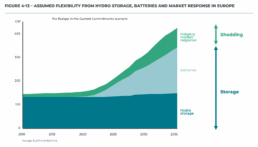
This is a really clean, strong visual thanks to the use of direct labels and some helpful annotations to the right. The only thing I don’t really like is that lonely vertical axis sticking out like a sore thumb at the left side of the visual. However, these labels and annotations are in the way when we want to move the axis to the right:
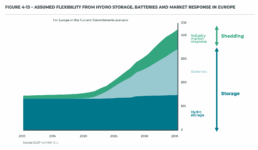
I’m probably just nitpicking, but that doesn’t look so great to me! In these situations, I will always prefer to switch to gridlines. Yes, they take up more space and create more ‘stuff’ in the visual, but they have two major benefits:
✅ more precision if you’re trying to estimate data values
✅ this precision boost impacts all parts of the visual: left, middle, and right
Here’s how that looks like for the visual above:
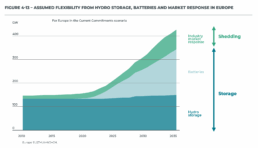
I’ve made the colored areas a little bit transparent, so you can still see the gridlines clearly enough. Notice how you can quite easily see that the total value is growing to 200 GW by 2025, and reaching 300 GW by 2030. These intermediate values were quite hard to read in the original visual!
Some final cleanup things we can do:
- nicely align the subtitle and the note with the rest of the visual
- add ticks to the horizontal axis as well
- optimize the annotation to the right, brackets would make more sense here than arrows I think
- add explicit data values for the different categories in 2035 to further increase precision
- move the ‘GW’ label to the tick label
This is how the end result looks like:

Finally, a small bonus tip. If for some reason you’re tight on space, and you have to squeeze your chart a bit to make everything fit, you don’t have to make your gridlines go all the way from left to right. You could consider only having them show up when they’re needed. That would give you some extra whitespace to fit, for example, your title and subtitle:
Of course, that’s something not every #dataviz tool will allow, so that’s only for when you’re willing to make some final custom modifications for your report.
Here’s the full comparison between our original visual, and the reworked chart:

Note: visuals taken from Elia’s ‘Adequacy and flexibility study for Belgium, 2026–2036’, which you can access here: Adequacy and flexibility study for Belgium (2026–2036) by Elia Group — Issuu
Read more:

Three roles of colour in a data visual
Colour is one of the most crucial tools we have to turn a normal chart into a powerful chart with a clear message, a chart which tells a story rather than simply presenting the information.

7 different goals for your chart
A crucial step in building a powerful chart is choosing the right type of chart. A lot of charts don’t work because they simply use the wrong type of chart. To avoid this trap, we must ask ourselves a basic question: what’s the ultimate goal of our data visual? What do we want to show with our data?

Making a data visual noise-free
Removing noise from a data visual is not only about taking things away such as gridlines, axes or legends. That’s just one part of it, which we could call removing physical noise. Improving the signal-to-noise ratio is often also about adding little things that help our audience better understand the visual. We are helping them by removing mental noise, or mental barriers.
Three tips to create powerful charts in Excel
Creating charts in Excel can be a very powerful tool for making sense of complex data sets, and for visualizing them. But the default options are not always the most pretty or effective ones. Here are our top three tips to create better Excel charts.

A powerful chart has a high signal-to-noise ratio
‘Less is more’. It’s a crucial principle in most of our communication, and in data visualization in particular. Because of my background as a physicist, I prefer to talk about the ‘signal-to-noise ratio’. The message - our signal - should be amplified as much as possible, giving it all of the attention. Everything that can distract from our message - the noise - should be removed.

A powerful chart tells a story
A powerful chart has a clear message. It should be short and meaningful, and obvious in the blink of an eye. If there’s only one thing our audience remembers at the end of the day, this should be it.
We are really into visual communication!
Every now and then we send out a newsletter with latest work, handpicked inspirational infographics, must-read blog posts, upcoming dates for workshops and presentations, and links to useful tools and tips. Leave your email address here and we’ll add you to our mailing list of awesome people!